10 guides for your next sales forecast review
Find what moved before you send the new number upstairs.

Start with the guide that explains what moved. Use Salesforce if the category totals may overlap, Pipedrive if a deal has moved between periods, and Outreach if you need to reconstruct what the team submitted last week. When the question is why a deal belongs in Commit, start with the guide to category evidence.
Eight product guides show how a forecast total is built and recorded. Jacob’s two articles cover the evidence for committing a deal and how to measure the miss after the period closes. Take the question back to your own setup if you use a different tool.
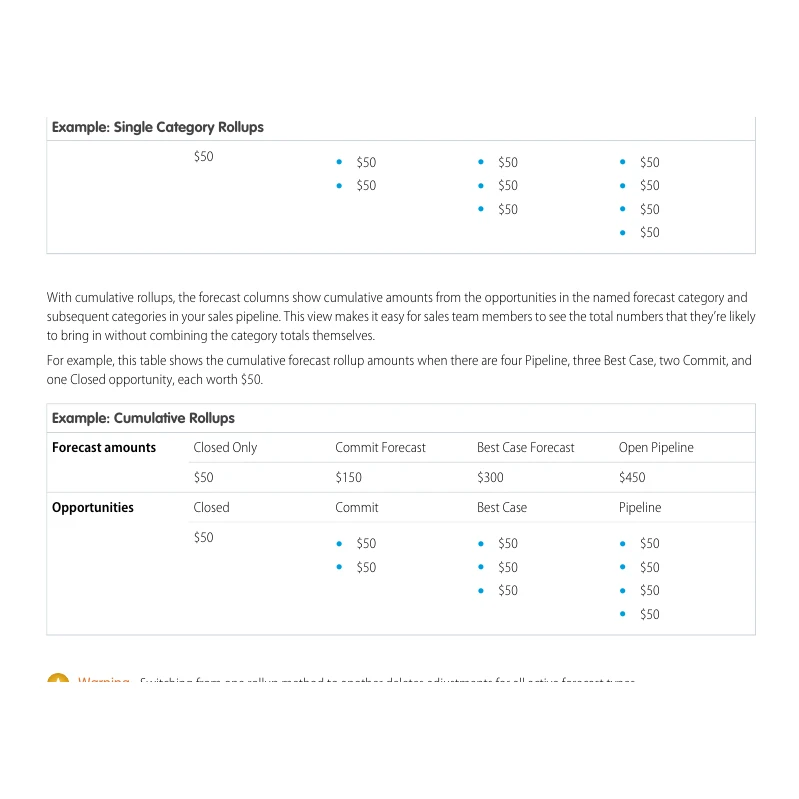
1. Salesforce Pipeline Forecasting Implementation Guide
Start here if you need to know whether adding two columns would count some opportunities twice. Salesforce shows the same set of opportunities in single-category and cumulative rollups. Ask which kind of column your team is reading before it adds Commit to Best Case.
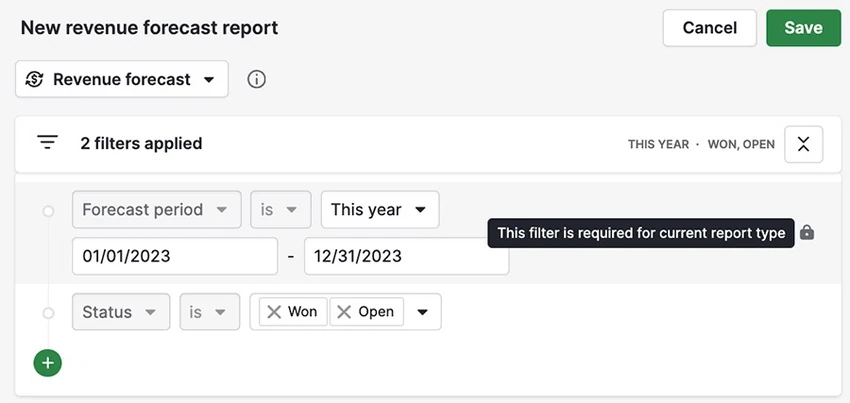
2. Pipedrive Deal Revenue Forecast
For deals that moved between months, start with the date the report uses. Pipedrive's report places open deals by expected close date and won deals by the date they were won. Pick one deal that moved and check which date drove its placement. An updated expected close date still needs a reason the buyer can confirm.
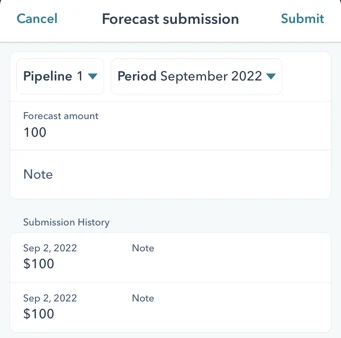
3. HubSpot Forecast Tool
This is for the gap between a seller’s submission and the pipeline total on screen. HubSpot shows where to enter a forecast amount and the note that goes with it. Ask which number the team passed on and what the seller used to arrive at it. The submission records their call at that point in time.
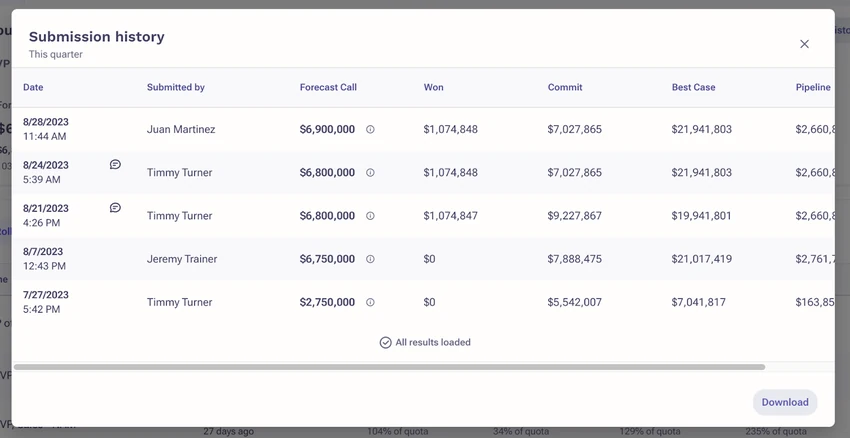
4. Outreach Forecast Rollup
Outreach’s history is useful when you need to reconstruct a previous forecast. Outreach documents a submission history with snapshots of the metrics and accompanying notes. Put two submissions from the same sales period and configuration side by side and see which movements the notes explain. A snapshot tells you what was submitted. You may need the deal history to see why it changed.
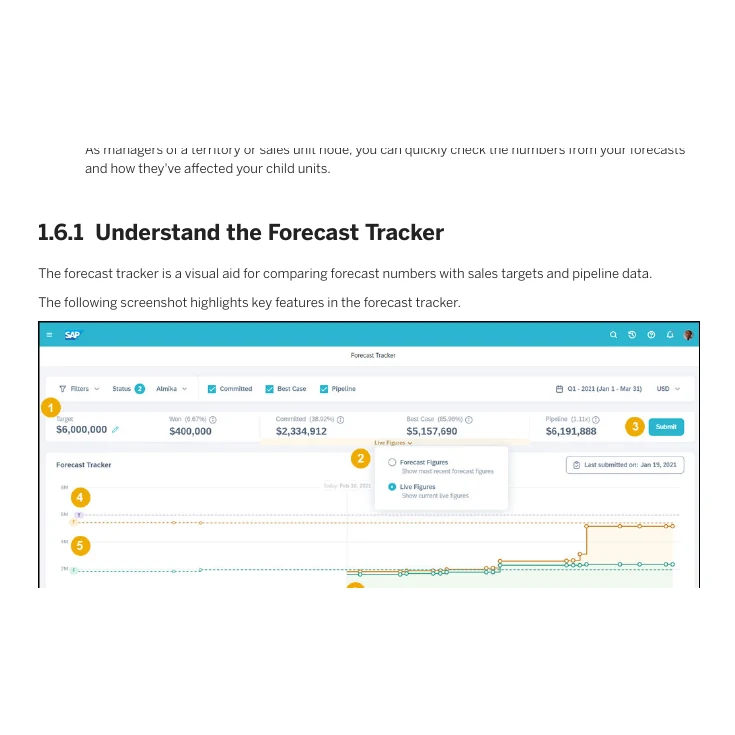
5. SAP Forecast Tracker
This guide helps when the submitted forecast and the current pipeline show different totals. SAP lets you switch between the numbers people submitted and the live totals from the pipeline. Check which view was on screen when someone quoted the number. One total reflects the latest submission in the selected view. The other reflects opportunities currently in the pipeline.
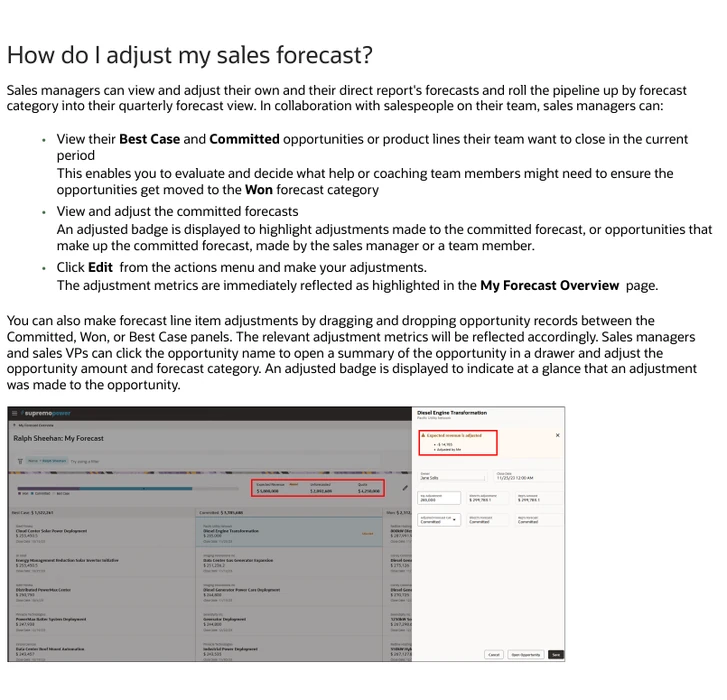
6. Oracle Fusion Cloud Sales Forecasting
This is for a forecast that includes a manager’s adjustment. Oracle describes an adjusted badge on the committed forecast or its opportunities when someone changes their values. In your review, ask which line moved and what new information supports the change.
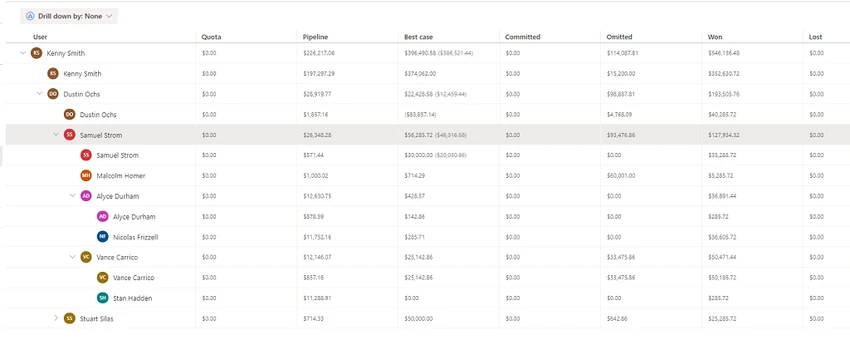
7. Dynamics 365 Sales Forecasting
Use the hierarchy view to find which part of the team a total represents. Microsoft's overview shows forecast categories, quotas and totals rolled up by team hierarchy. Compare the same team and period on both sides of the review. If the reporting structure changed, establish which deals sit under each manager before interpreting the difference.
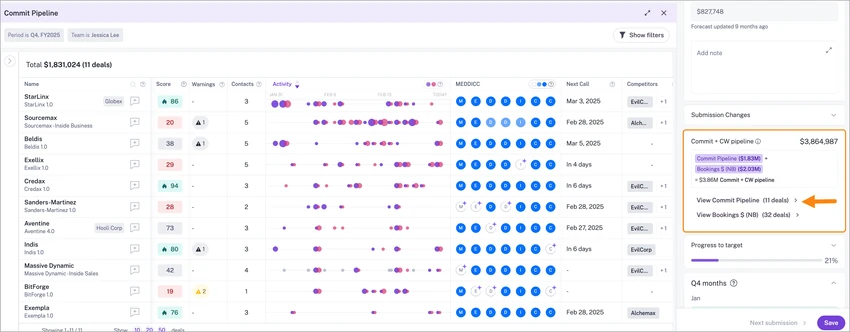
8. Gong Forecast Boards
Open this guide when you need the individual deals behind a total. Gong shows how to open the deal board from forecasting and review the pipeline for a category. In your review, pick a deal that moved the total and ask what changed on the buyer’s side. The board gives you the deal to investigate.

9. Commit vs Best Case
For a disputed Commit, start with the customer evidence. Jacob's article asks what the customer has done that makes the date credible. Bring the next decision, the person who owns it and the evidence for the date to the review.

10. Sales Forecast Accuracy
After the period closes, measure how far the forecast missed and in which direction. Compare forecasts made at the same point before close, then look for a pattern across periods. The miss gives you a place to investigate. The deal records and submission notes help you find the cause.
For the next forecast call, take one movement in the total and trace it to the underlying deal, the date, the submission or the adjustment. If the change depends on a customer's decision, make the next review about what the team has learned from that customer. Help with your team’s Sales Engineering deal reviews starts with the customer evidence your team needs to make a decision.
Sources
- Salesforce Pipeline Forecasting Implementation Guide
- Pipedrive Deal Revenue Forecast
- HubSpot Forecast Tool
- Outreach Forecast Rollup
- SAP Forecast Tracker
- Oracle Fusion Cloud Sales Forecasting
- Dynamics 365 Sales Forecasting
- Gong Forecast Boards
- Commit vs Best Case
- Sales Forecast Accuracy
Sources checked on 8 November 2026.